
Practice · 4 min read
Film Pool Practice From Two Angles Without Losing the Shot Line
Two views can answer different questions, but only if the shot stays the same. A rear-line view helps you inspect cue alignment and lateral movement; a side view helps you inspect head, forearm and cue timing. This protocol registers both views to one fixed layout, records matched blocks and scores observable events. A phone video is evidence from one perspective—not a three-dimensional motion measurement.
Freeze one safe, repeatable shot
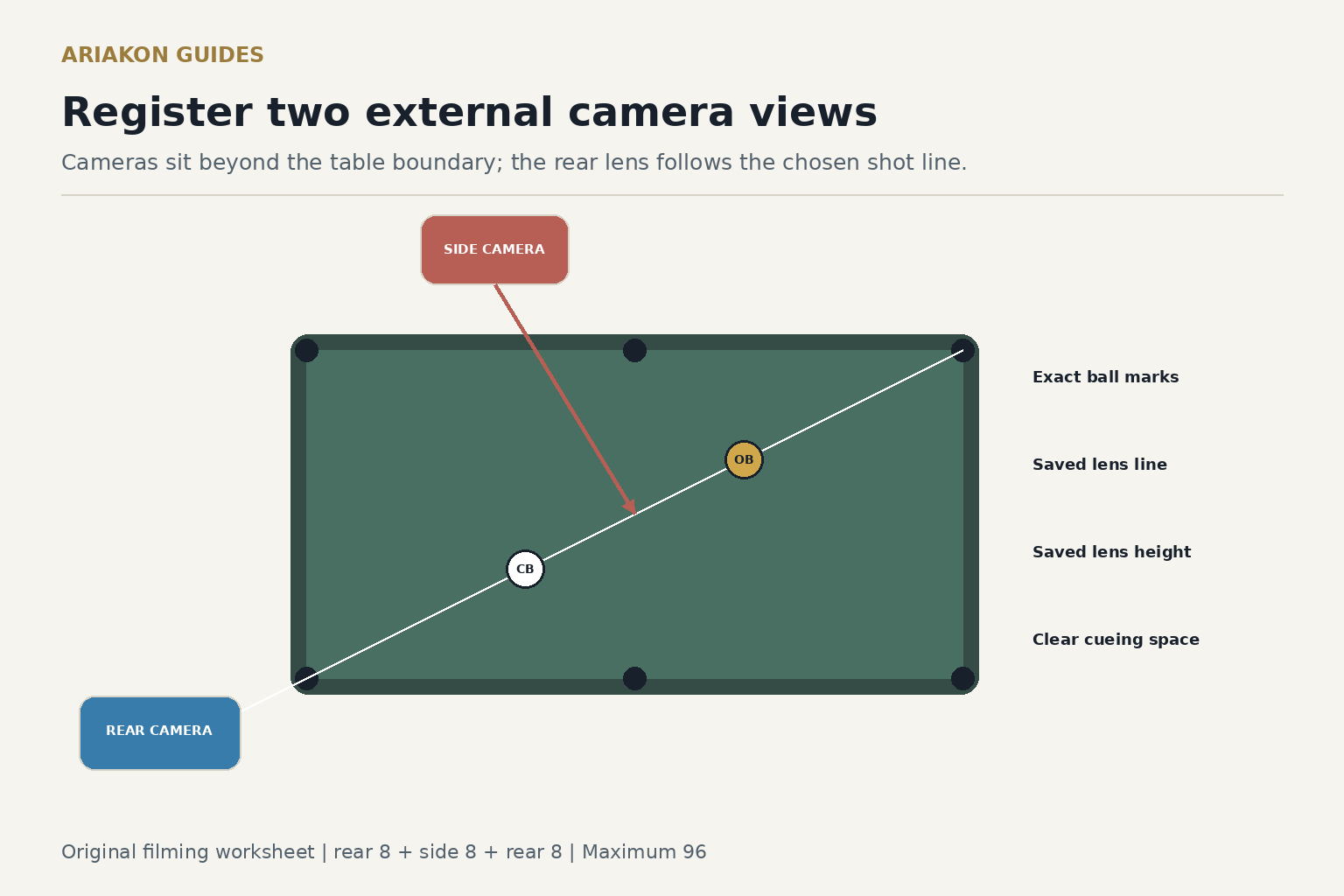
Choose a straight stop shot to a corner. Put the object ball about one diamond from the pocket and the cue ball one diamond straight behind it. Mark both centers with removable reinforcements, then remove anything that could touch a moving ball. Mark a one-ball-wide cue-ball finish window around the cue-ball center at object-ball contact: one ball diameter behind the object-ball center on this straight line. Use the same balls, pocket and comfortable speed for all scored attempts.
Keep every camera, tripod and cable beyond the table boundary and outside player traffic. Never place a device on the cloth or in a cue, ball or spectator path. If the room cannot support a safe side view, use one camera sequentially and move it only between blocks.
Learn what slow motion can and cannot diagnose before interpreting single frames as causes.
Use a cue-ball-contact filming protocol when tip contact is the specific question.
Register the rear-line view
Place the lens behind the player's standing line, far enough back to show the grip hand, bridge, cue ball, object ball and called pocket. Center the frame on the cue-ball-to-object-ball line—not on the table's centerline. Use two harmless rail-top references, such as pieces of painter's tape on the outside wood, to record the tripod-foot line and lens height. Do not put tape on cloth or cushion rubber.
Before shooting, capture a two-second setup frame with the cue ball, object ball and pocket visible. The image should show whether the lens has returned to the same registration. A rear view can reveal left-right image movement, but perspective and an off-center lens can exaggerate it.
Register the side view
Place the lens roughly perpendicular to the cue near the cue ball, outside the player's reach and walkway. Frame the bridge, cue ball, grip hand, elbow and enough cue travel to see the final backswing and forward stroke. Record its own rail-top reference and lens height. Do not try to make the side frame share the rear frame's dimensions; each view has a different job.
Lock focus and exposure if the device allows it, and avoid digital zoom. Use the same normal recording mode for the entire session. Higher frame rates can show more moments but need more light; the drill does not require a claimed frame rate.
Record twenty-four shots in matched blocks
Replace the balls from the fixed marks and step away before each shot. If two cameras record simultaneously, still label one rear clip and one side clip for each attempt; do not combine observations into an invented angle measurement. If one camera is moved, capture the registration frame before Block B and again before Block C.
| Block | View | Attempts | Question |
|---|---|---|---|
| A | Rear line | 8 | Does cue alignment or lateral cue movement repeat? |
| B | Side | 8 | Do head, grip and cue timing repeat? |
| C | Rear line again | 8 | Does the opening view return after the camera change? |
Score the shot and the evidence separately
Add one observation code after each clip: rear—cue appears left, centered or right at contact; side—head rises before, near or after contact. Unknown is valid when the frame does not show the event. These are screen observations, not proof of the physical cause.
Worked example: rear Blocks A and C show centered cue delivery on thirteen of sixteen clips, while the side block shows early head rise on six of eight. Pocket and stop scores fall only in the side block. First repeat eight rear shots after restoring registration. If the result returns, test the side setup without changing technique; the camera position or attention demand may be part of the difference.
| Point | Requirement |
|---|---|
| 1 | Both balls started on their fixed marks |
| 1 | The active camera matched its saved registration |
| 1 | The object ball was pocketed in the called corner |
| 1 | The cue-ball center finished in the stop window |
| Maximum 96 | Twenty-four attempts; keep view and outcome columns separate |
Use one observation in a no-camera transfer
Choose one neutral cue from the review, such as keep eyes still through contact. Remove the camera from the playing area and shoot six unfilmed stop shots from the same marks. Score only pocket and stop window, maximum twelve. Video review should produce one testable action, not a list of simultaneous mechanical changes.
Review bridge-hand stability on video when the rear view points to the front support rather than the whole stroke.